Thursday, 29 March 2018

Automate monitoring weblogic parameters using scripts


    At times working with SOA, OSB which run on Weblogic, there arises a requirement to monitor your server health, pending messages in queues, thread performance, and not use the admin console in doing so.
    In such cases, there arises a demand for scripts to do the dirty work. In this post, we will cover a few basic scripts that can be implemented to monitor these parameters.
    Not going into much depth right now, please find the scripts that are a mix of wlst, shell and python.
    Little or basic knowledge of these languages is required to perform this activity immediately.
    These scripts are written in two parts for better understanding. The caller (shell) and the called (python).
    Effectively the .py files are passing connection parameters to invoke the specific mBeans.

  • ServerHealth Monitoring

    The .py file is being invoked by the .sh and the date is written to a temp file. The temp file is then acted upon to fetch the final value.
  • ##################################ServerHealth.sh##################################
    #ServerHealth.py
    connect(‘username’,’password’,’t3://:)
    domainRuntime()
    cd('/ServerRuntimes/soa_server1/ThreadPoolRuntime/ThreadPoolRuntime')
    x=get('ServerHealthState')
    print x
    # ServerHealth.sh
    #!/bin/bash
    /……path to your wlst…/bin/./wlst.sh ServerHealth.py >expendable.txt
    tail -1 expendable.txt |cut -d',' -f2 | cut -d':' -f2

  • Hogging thread monitor

  • This is an important parameter to identify the health of the server. Alerts can be configured if the configured parameter breaches its threshold. The same hierarchy is followed here as depicted above.
    ##################################hogging.sh##################################
    #hog.py
    connect(‘username’,’password’,’t3://:)
    domainRuntime()
    cd('/ServerRuntimes/soa_server1/ThreadPoolRuntime/ThreadPoolRuntime')
    x=get('HoggingThreadCount')
    print x
    #hogging.sh
    #!/bin/bash
    /……path to your wlst…/bin/./wlst.sh hog.py >expendable.txt
    tail -2 expendable.txt
  • Pending messages in queues.

  • ##################################RTEQ.sh################################## 
    RTEQ.py
    connect(‘username’,’password’,’t3://:)
    domainRuntime()
    cd('ServerRuntimes/soa_server1/JMSRuntime/*server1.jms/JMSServers/JMSServer-1/Destinations/*Module*')
    x=get('MessagesCurrentCount')
    print x
    #!/bin/bash
    /opt/egate/middleware/Oracle_OSB1/common/bin/./wlst.sh RTEQ.py >expendable.txt
    tail -1 expendable.txt
    rm expendable.txt

Happy scripting....Feel free to share your scripts so everyone can benefit. 

Tuesday, 7 November 2017

OIM query to find Request Justification of a Request

Below is the sql query to find request justification for a user for already provisioned resource in OIM:

SELECT REQUEST.REQUEST_JUSTIFICATION FROM REQUEST
WHERE REQUEST_ID =(SELECT REQUEST_KEY FROM UD_ADUSER
WHERE UPPER(UD_ADUSER_USERID)=UPPER(?)  //user login
AND ORC_KEY IN (SELECT OIU.ORC_KEY FROM OBJ,OBI,OIU,OST,USR
WHERE OBJ.OBJ_KEY=OBI.OBJ_KEY
AND OBI.OBI_KEY=OIU.OBI_KEY
AND OIU.USR_KEY=USR.USR_KEY
AND OIU.OST_KEY=OST.OST_KEY
AND OST.OBJ_KEY=OBJ.OBJ_KEY
AND OBJ.OBJ_NAME='Active Directory'
AND OST.OST_STATUS IN ('Enabled','Provisioned')));

Thursday, 26 October 2017

Assign Access Policy to Role

This post helps you to pro-grammatically assign an access policy to role.Below is the code snippet:

                /**
                 * Assign access policy to role
                 * @param roleName
                 */
     public void assignAccessPolicyToOIMRole(String roleName) {
                Role role = null;
                SearchCriteria criteria = null;
                List<Role> roles = null;
                tcAccessPolicyOperationsIntf accessPolicyOperationsIntf=null;
                try {         
                                accessPolicyOperationsIntf=Platform
                                                                .getService(tcAccessPolicyOperationsIntf.class);
                                criteria = new SearchCriteria(RoleManagerConstants.ROLE_NAME,
                                roleName, SearchCriteria.Operator.EQUAL);
                                roles = roleManager.search(criteria, null, null);
                                HashMap<String, Object> roleMapAttrs = new HashMap<String,  
                                 Object>();
                                Map<String, List<String>> accessPoliciesMap = new  
                                                                 HashMap<String,List<String>>();
                                List<String> accessPolicies = new ArrayList<String>();
                                String accessPolicyName="Test Access Policy";
                                String  accessPolicyKey                                     =getAccessPolicyKey(accessPolicyName,accessPolicyOperationsIntf);
                                accessPolicies.add(accessPolicyKey);
                                accessPoliciesMap.put("ADD",accessPolicies);
                                roleMapAttrs.put(RoleManagerConstants.ACCESS_POLICIES,
                                         accessPoliciesMap);
                                role = new Role(roleMapAttrs);
                                RoleManagerResult roleManagerResult = roleManager.modify(
                                           RoleManagerConstants.ROLE_NAME,  
                                        roleName, role);
                                } catch (RoleSearchException e) {
                                                e.printStackTrace();
                                } catch (AccessDeniedException e) {
                                                e.printStackTrace();
                                } catch (ValidationFailedException e) {
                                                e.printStackTrace();
                                } catch (RoleModifyException e) {
                                                e.printStackTrace();
                                } catch (NoSuchRoleException e) {
                                                e.printStackTrace();
                                } catch (RoleLookupException e) {
                                                e.printStackTrace();
                                }

Get access policy key:  

private String getAccessPolicyKey(String accessPolicyName,
                                                tcAccessPolicyOperationsIntf accessPolicyOperationsIntf) {
                Map <String,String> apAttributeList = new HashMap<String,String>();
                String accessPolicyKey = null;
                try {
                                apAttributeList.put("Access Policies.Name", accessPolicyName);
                                                tcResultSet resultSet = accessPolicyOperationsIntf
                                                                                .findAccessPolicies(apAttributeList);
                                                if (resultSet == null || resultSet.getRowCount() == 0) {
                                                                return accessPolicyKey;
                                                }
                                                for (int i = 0; i < resultSet.getRowCount(); i++) {
                                                                resultSet.goToRow(i);
                                                                accessPolicyKey = resultSet.getStringValue("Access 
                                                                             Policies.Key");
                                                }
                                } catch (tcAPIException | tcColumnNotFoundException e) {
                                                    e.printStackTrace();
                                }
               
                return accessPolicyKey;
}    


Monday, 12 September 2016

OIM Query to fetch Process Tasks with Status as Cancelled

If you find yourself in a situation where you need to find all the process tasks that got cancelled,dont worry ,below query will help you to fetch that.

SELECT USR.USR_LOGIN,USR1.USR_LOGIN AS UPDATEBY_USERLOGIN,MIL.MIL_NAME,
SCH.SCH_STATUS,STA.STA_BUCKET,OSI.SCH_KEY,USR.USR_START_DATE,
SCH_ACTUAL_START, SCH_ACTUAL_END
FROM
USR,OSI,OIU,OST,ORC,OBJ,USR USR1,SCH,STA,MIL,TOS,PKG,UD_EBSUM
WHERE
OSI.MIL_KEY=MIL.MIL_KEY
AND OIU.USR_KEY=USR.USR_KEY
AND OIU.OST_KEY=OST.OST_KEY
AND OST.OBJ_KEY=OBJ.OBJ_KEY
AND OSI.ORC_KEY=OIU.ORC_KEY
AND SCH.SCH_KEY=OSI.SCH_KEY
AND STA.STA_STATUS=SCH.SCH_STATUS
AND TOS.PKG_KEY=PKG.PKG_KEY
AND MIL.TOS_KEY=TOS.TOS_KEY
AND OST.OST_STATUS = 'Provisioned'    // any account status
AND STA.STA_BUCKET = 'Cancelled'      // any process task status
AND PKG.PKG_NAME= 'EBSUM'  //resource name
AND ORC.ORC_KEY=UD_EBSUM.ORC_KEY
AND ORC.ORC_KEY=OIU.ORC_KEY
AND OSI.OSI_UPDATEBY = USR1.USR_KEY;


Table Name
Description
USR
All user information
OSI
Holds information about tasks that are created for an order
OIU
OBJECT INSTANCE REQUEST TARGET USER INFORMATION
OST
OST: OBJECT STATUS INFORMATION.
- Contains users, resource objects and all objects
SCH
Scheduled Item Table
- Used by tcScheduledTask to run scheduled Tasks
STA
Status Codes
TOS
Holds information about a process
MIL
Tasks in Processes
- Contains all tasks from all processes.
PKG
Package Hierarchy Table Holds The Parent-child Relationships Between Processes
ORC
Order Content Item Table
- Used by ScheduledTask to run a set of ordered events
OBJ
Resource Object definition information.

Note: You can use the above query to get process tasks for any status and resource object.

Wednesday, 15 June 2016

oracle.iam.connectors.icfcommon.prov.ICProvisioningManager : createObject : Error while creating user[[ org.identityconnectors.framework.common.exceptions.ConnectorException: Missing required configuration option [passcode]


Issue:
While provisioning a user to web service target,provisioning fails with below exception:
[oim_server1] [ERROR] [] [ORACLE.IAM.CONNECTORS.ICFCOMMON.PROV.ICPROVISIONINGMANAGER] [tid: [ACTIVE].ExecuteThread: '6' for queue: 'weblogic.kernel.Default (self-tuning)'] [userId: xelsysadm] [ecid: f88c518f300030ab:725e1e6f:15365304de7:-8000-0000000000051895,0] [APP: oim#11.1.2.0.0] [DSID: 0000LDt0YWzB_6^Y1TbAFV1Msdit000026] oracle.iam.connectors.icfcommon.prov.ICProvisioningManager : createObject : Error while creating user[[
org.identityconnectors.framework.common.exceptions.ConnectorException: Missing required configuration option [passcode]
        at oracle.iam.connectors.icfcommon.ConnectorFactory$ConnectorConfigurator.configure(ConnectorFactory.java:341)
        at oracle.iam.connectors.icfcommon.ConnectorFactory.createConnectorFacade(ConnectorFactory.java:190)
        at oracle.iam.connectors.icfcommon.prov.ICProvisioningManager.init(ICProvisioningManager.java:113)
        at oracle.iam.connectors.icfcommon.prov.ICProvisioningManager.init(ICProvisioningManager.java:122)


Debugging:
Check oim_server1-digaonistic.log, diagonsitic.log under soa_server1/owsm/msglogging to find the cause of provisioning failure.

Cause:
Value for field in IT Resource was missing or was not set.

Solution:
Here as the exception says(Missing required configuration option [passcode]
), the value for field “passcode” was not passed.

org.identityconnectors.genericws.GenericWSConnector : create :Error during create[[ javax.xml.ws.soap.SOAPFaultException: FailedAuthentication : The security token cannot be authenticated.


Issue:
While provisioning a user to web service target,provisioning fails with below exception:
2016-03-15T00:08:38.654-07:00] [oim_server1] [ERROR] [] [ORG.IDENTITYCONNECTORS.GENERICWS.GENERICWSCONNECTOR] [tid: [ACTIVE].ExecuteThread: '6' for queue: 'weblogic.kernel.Default (self-tuning)'] [userId: xelsysadm] [ecid: f88c518f300030ab:725e1e6f:15365304de7:-8000-0000000000051abd,0] [APP: oim#11.1.2.0.0] [DSID: 0000LDsxDyxB_6^Y1TbAFV1Msdit000023] org.identityconnectors.genericws.GenericWSConnector : create : Error during create[[
javax.xml.ws.soap.SOAPFaultException: FailedAuthentication : The security token cannot be authenticated.
        at com.sun.xml.ws.fault.SOAP11Fault.getProtocolException(SOAP11Fault.java:197)
        at com.sun.xml.ws.fault.SOAPFaultBuilder.createException(SOAPFaultBuilder.java:122)
        at com.sun.xml.ws.client.sei.SyncMethodHandler.invoke(SyncMethodHandler.java:125)
        at com.sun.xml.ws.client.sei.SyncMethodHandler.invoke(SyncMethodHandler.java:95)
        at com.sun.xml.ws.client.sei.SEIStub.invoke(SEIStub.java:136)
        at com.sun.proxy.$Proxy1166.create(Unknown Source)
        at sun.reflect.NativeMethodAccessorImpl.invoke0(Native Method)
        at sun.reflect.NativeMethodAccessorImpl.invoke(NativeMethodAccessorImpl.java:57)
        at sun.reflect.DelegatingMethodAccessorImpl.invoke(DelegatingMethodAccessorImpl.java:43)
        at java.lang.reflect.Method.invoke(Method.java:606)
        at weblogic.wsee.jaxws.spi.ClientInstanceInvocationHandler.invoke(ClientInstanceInvocationHandler.java:84)
        at com.sun.proxy.$Proxy1115.create(Unknown Source)
        at org.identityconnectors.genericws.GenericWSConnector.create(GenericWSConnector.java:142)
        at org.identityconnectors.framework.impl.api.local.operations.CreateImpl.create(CreateImpl.java:80)
        at sun.reflect.GeneratedMethodAccessor2573.invoke(Unknown Source)
        at sun.reflect.DelegatingMethodAccessorImpl.invoke(DelegatingMethodAccessorImpl.java:43)

Debugging:
Check oim_server1-digaonistic.log, diagonsitic.log under soa_server1/owsm/msglogging or soa_server1.out log to find the cause of provisioning failure.

Cause:
soaUserPassword or soaUserName must be incorrect.

Solution:
Pass correct values for soaUserPassword and soaUserName.

Friday, 10 June 2016

Deploying and Configuring Web Service Connector

This blog post illustrates deployment of web service connector's SOA composite and configuring IT Resource.

Deploying SOA composite on SOA Server :
There are two ways to deploy
 a. Directly from Jdeveloper using "Deploy to Application Server".
 b. Creating a jar file using "Deploy to sar". and then deploy manually through EM console.
     We will use (b) option.

1. Create a jar out of SOA composite as follows :


2. Click Next and Select Deploy to Sar.


3. Login to EM console through e.g. http://<Hostname>:<Port>/em
4. Expand SOA on the left hand-side
5. Right Click default as shown below:
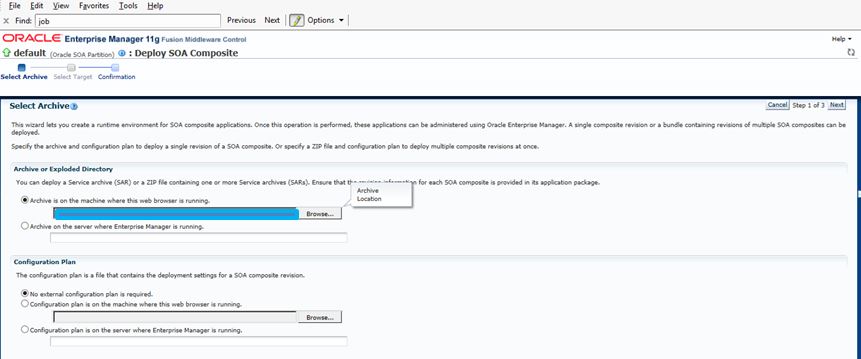
6. Select Deploy to this partition.


7. Select the jar file path and click next


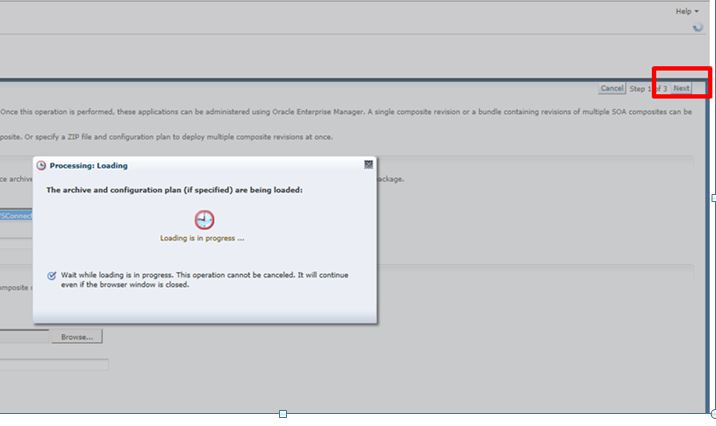
 8. Loading process will start,wait and then click next.


9. Click Finish.
10. You should see a successful deployed message and the composite deployed under default partition.

Redeploying SOA Composite:
Any changes you make to your SOA composite,you would need to redeploy the composite on server.
Steps to redeploy:
1. Right Click on you composite from EM console.
2.Follow the instructions and proceed
Note : If you do not want to change the deployment version e.g the previous version was Jive1.0 then select "Deploy to default composite".

Configuring IT Resource :
1. Open your web service connector IT Resource
2. Configure values

Parameter
Value
Configuration Lookup
Lookup.Jive.Configuration
WSS_CSF_KEY
can leave blank
passcode
*******
securityPolicies
Oracle/wss_username_token_client_policy
soaServiceWSDL
wsdl url from EM console (This you can get from em console ,right click on composite and go to Test tab, up there will be a wsdl url, copy that here)
soaUserName
weblogic
soaUserPassword
********


Thanks !